为什么需要微前端?
有一个企业管理平台,包含商品管理、价格管理、订单管理等模块。每个模块由不同团队维护,这些团队分布在不同城市,对技术栈的偏好也不一样。核心问题:如何让各团队各自独立开发、互不干扰,同时用户看到的还是一个统一的系统?
传统方案问题:
- 单体应用 → 代码在一个仓库,A 团队改代码,B 团队要拉代码、解冲突、重新部署,沟通成本高
- 子域名分离 →
products.acme.com、pricing.acme.com→ 团队是独立了,但用户要跳来跳去
微前端解决方案:
- 各团队代码在独立仓库,改代码不影响其他团队
- 各团队独立部署,不需要协调发布时间
- 用户看到的还是同一个网站
app.acme.com
本质上,微前端是为了减少团队间的协作成本。但是微前端会带来更多的运营成本,和架构的复杂性。
微前端的实现方案
主流的微前端有几种做法,我们这里只讨论两种做法,核心区别在于隔离程度。
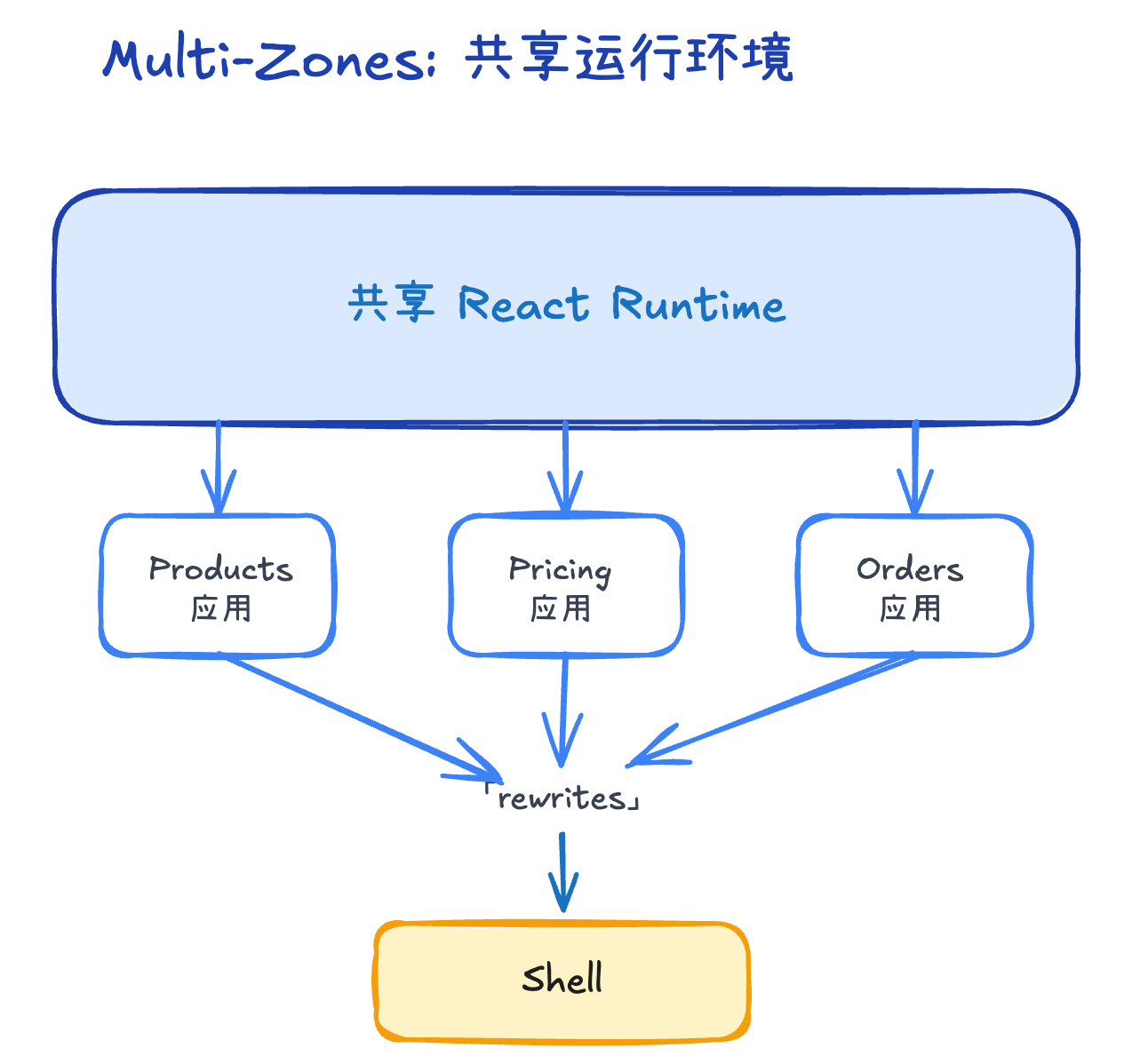
Multi-Zones:共享运行环境
Multi-Zones 是一个路径代理方案:有一个 Shell 应用负责接收所有请求,根据 URL 路径(如 /products、/pricing)转发到对应的子应用。每个子应用都是完整独立的 Next.js 应用,有自己的 next.config.js 和 package.json,可以单独开发、单独部署。核心特点是所有子应用共享同一个 React 运行环境,就像多个房间共用一套水电系统,轻量、快速,SEO 友好,但要求统一技术栈(都用 Next.js),而且要小心 CSS 和 JS 可能会互相干扰。
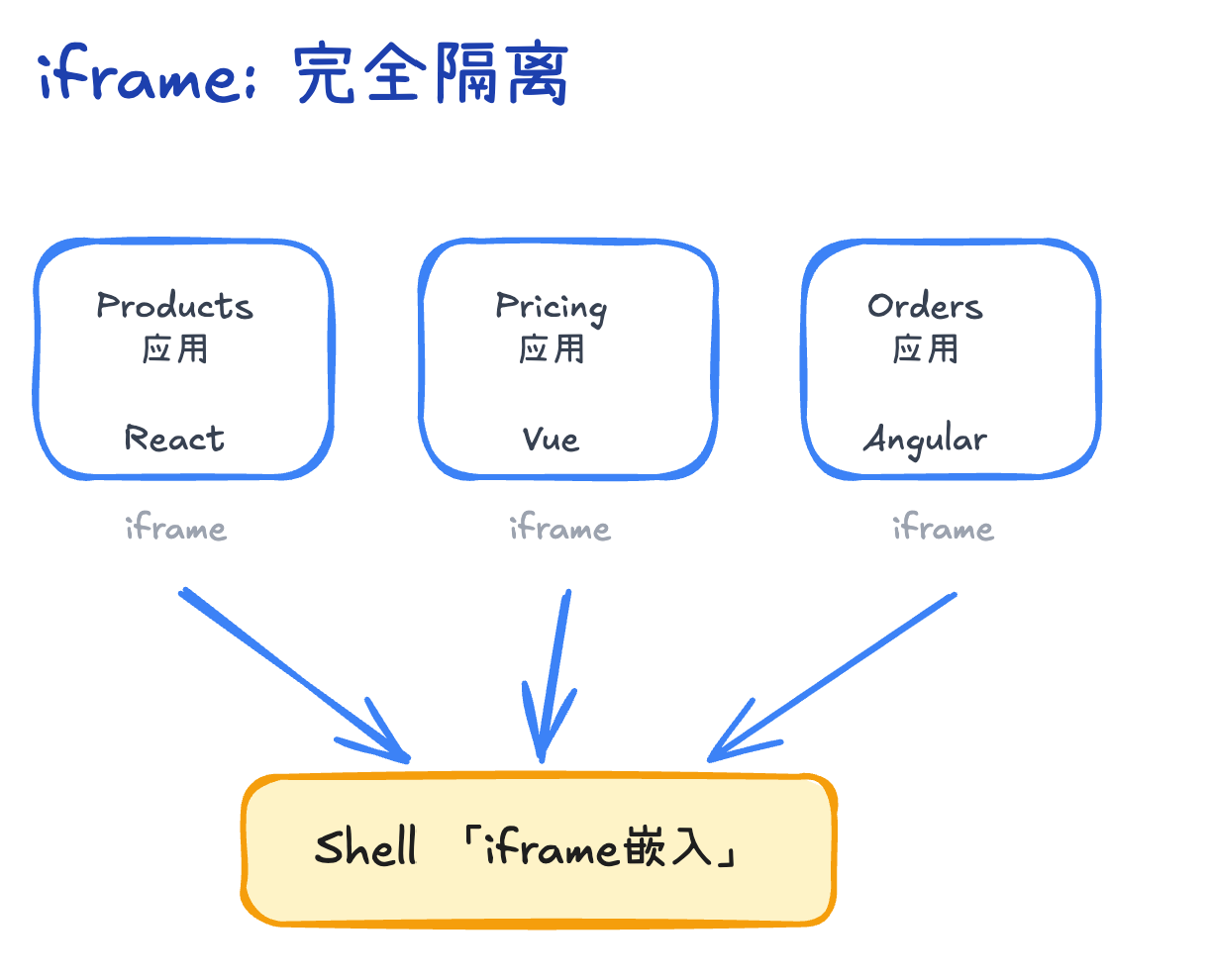
iframe:完全隔离
iframe 方案里,Shell 用 iframe 标签嵌入各个子应用,每个应用在自己独立的 window 环境中运行,就像每个房间都有自己独立的水电系统。好处是完全隔离(CSS/JS 绝对不冲突)、技术栈自由(React、Vue、Angular 随便混)、子应用完全独立可直接访问,但代价是每个应用都要加载自己的框架(性能差)、SEO 不友好、可能有双滚动条问题。
如何选择?
| 场景 | 推荐方案 | 原因 |
|---|---|---|
| 面向用户的网站 | Multi-Zones | 性能好、SEO 友好 |
| 企业内部系统 | iframe | 简单、灵活、隔离好 |
| 多技术栈团队 | iframe | 不受技术栈限制 |
| 追求极致性能 | Multi-Zones | 共享资源,加载快 |
不确定?先用 iframe(更简单、更灵活、容易迁移)
共同的架构基础
不管用 Multi-Zones 还是 iframe,以下问题都需要解决。
子应用注册表
创建一个配置文件,管理所有子应用的信息:
// apps/shell/config/mfe-registry.ts
export const MFE_REGISTRY = {
  products: {
    title: '商品管理',
    basePath: '/products',
    url: process.env.PRODUCTS_URL || 'https://products.internal.com',
    icon: '📦',
  },
  pricing: {
    title: '价格管理',
    basePath: '/pricing',
    url: process.env.PRICING_URL || 'https://pricing.internal.com',
    icon: '💰',
  },
  orders: {
    title: '订单管理',
    basePath: '/orders',
    url: process.env.ORDERS_URL || 'https://orders.internal.com',
    icon: '📋',
  },
};好处:新增模块只需修改这一个文件,路由、侧边栏、权限等配置自动生效。
统一 Layout
用户希望看到统一的侧边栏和顶栏,不管在哪个模块。
架构设计
┌────────────────────────────────────────┐
│ Shell (app.acme.com)                   │
│ ┌──────┐ ┌───────────────────────────┐ │
│ │侧边栏 │ │                           │ │
│ │      │ ├       主内容区域            ┤ │
│ │📦商品 │ │                           │ │
│ │💰价格 │ │                           │ │
│ │📋订单 │ │     (子应用渲染在这里)       │ │
│ │      │ │                           │ │
│ └──────┘ └───────────────────────────┘ │
└────────────────────────────────────────┘
Shell Layout
// apps/shell/app/layout.tsx
export default function RootLayout({ children }) {
  return (
    <html>
      <body>
        <div className="flex">
          <Sidebar />  {/* 侧边栏 */}
          <div className="flex-1">
            <Header />  {/* 顶栏 */}
            <main>{children}</main>  {/* 子应用内容 */}
          </div>
        </div>
      </body>
    </html>
  );
}
侧边栏实现
// apps/shell/components/Sidebar.tsx
import { MFE_REGISTRY } from '@/config/mfe-registry';

export function Sidebar() {
  return (
    <nav>
      {Object.values(MFE_REGISTRY).map(mfe => (
        <Link key={mfe.basePath} href={mfe.basePath}>
          {mfe.icon} {mfe.title}
        </Link>
      ))}
    </nav>
  );
}
用户认证:登录一次,全局通用
通过 Cookie 共享实现单点登录。
原理
确保所有应用部署在同一个父域名下:
app.acme.com
products.acme.com
pricing.acme.com
只要 Cookie 设置成父域名 .acme.com,所有子域名都能读到。
关键规则:Cookie 共享只检查协议 + 域名,不检查端口(但 localhost 是特例,不同端口无法共享)。
| 场景 | Cookie 能否共享 |
|---|---|
localhost:3000 → localhost:3001 | ✗ 不能(localhost 限制) |
app.com:3000 → app.com:3001 | ✓ 能(Cookie 不检查端口) |
app.com → api.com | ✗ 不能(域名不同) |
shell.local.com → products.local.com+ domain: '.local.com' | ✓ 能(父域名 Cookie) |
Shell:用户登录后设置 Cookie
// 用户在 Shell 登录
cookies().set('auth_token', token, {
  domain: '.acme.com',  // 关键:设置为父域名
  httpOnly: true,
  secure: true,
});
子应用:直接读取 Cookie
// Products 应用
import { cookies } from 'next/headers';

export default async function ProductsPage() {
  const token = cookies().get('auth_token'); // 直接能读到!

  if (!token) {
    redirect('/login'); // 没登录就跳回登录页
  }

  // 用 token 调用后端 API
  const products = await fetchProducts(token.value);
  return <ProductList products={products} />;
}总结:
- ✅ 用户登录一次
- ✅ Cookie 自动共享给所有子应用
- ✅ 子应用直接读取,无需再登录
跨模块导航与数据传递
基本跳转
跨模块跳转就像普通页面跳转,用 Link 组件:
import Link from 'next/link';

// 在 Products 应用里
<Link href="/pricing/edit/123">
  设置价格
</Link>注意:跨模块跳转会触发完整页面刷新(不是 SPA 的无刷新跳转)。
传数据方式
假设你在商品管理改了一个商品,跳到价格管理设置价格,需要传商品信息。
方式 1:URL 参数
// Products 应用:传数据
<Link href="/pricing/edit/123?productName=iPhone&category=phone">
  设置价格
</Link>

// Pricing 应用:收数据
export default function PricingEdit({ searchParams }) {
  const { productName, category } = searchParams;
  return <div>为 {productName} 设置价格</div>;
}适合:简单数据、不敏感信息
方式 2:LocalStorage
// Products 应用:存数据
const handleEditPrice = () => {
  localStorage.setItem('current_product', JSON.stringify({
    id: 123,
    name: 'iPhone',
    specs: { ... },
  }));
  router.push('/pricing/edit');
};

// Pricing 应用:取数据
useEffect(() => {
  const product = JSON.parse(localStorage.getItem('current_product'));
  console.log(product);
}, []);适合:复杂数据、临时传递
方式 3:后端存储
// Products 应用:存到后端
await fetch('/api/session/set', {
  method: 'POST',
  body: JSON.stringify({
    key: 'current_product',
    value: { id: 123, name: 'iPhone' },
  }),
});
router.push('/pricing/edit');

// Pricing 应用:从后端读
const response = await fetch('/api/session/get?key=current_product');
const product = await response.json();适合:生产环境、敏感数据
方式对比
| 方式 | 适用场景 | 优势 | 劣势 |
|---|---|---|---|
| URL 参数 | 简单数据 | 简单、可分享链接 | URL 太长不好看 |
| LocalStorage | 复杂数据 | 可传大对象 | 仅客户端、需手动清理 |
| 后端存储 | 生产环境 | 安全、持久 | 需要额外接口 |
Multi-Zones 实现细节
rewrites 配置与跨域处理
Shell 应用负责路由分发,同时解决跨域问题。
// apps/shell/next.config.js
const { MFE_REGISTRY } = require('./config/mfe-registry');

module.exports = {
  async rewrites() {
    return [
      // 转发子应用
      ...Object.values(MFE_REGISTRY).map(mfe => ({
        source: `${mfe.basePath}/:path*`,
        destination: `${mfe.url}${mfe.basePath}/:path*`,
      })),

      // 转发 API(避免跨域)
      { source: '/api/products/:path*', destination: 'https://api.acme.com/products/:path*' },
      { source: '/api/pricing/:path*', destination: 'https://api.acme.com/pricing/:path*' },
    ];
  },
};工作原理:
- 用户访问
app.acme.com/products/123 - Shell 检查路径,匹配到
/products - 服务端转发到
products.internal.com/products/123 - 返回 HTML,用户看到的网址还是
app.acme.com
关键优势:
- ✅ Shell 的 rewrites 是服务端代理,浏览器不知道真实地址,没有跨域问题
- ✅ 子应用调用 API 也通过 Shell 转发(如
/api/products/123),避免 CORS - ✅ 跨域请求检查协议 + 域名 + 端口,通过代理统一为同源请求
子应用配置
子应用只需声明自己的路径前缀:
// apps/products/next.config.js
module.exports = {
  basePath: '/products', // 我的所有路由都以 /products 开头
};
子应用 Layout(嵌入模式)
// apps/products/app/layout.tsx
export default function ProductsLayout({ children }) {
  // 不渲染 html/body,只渲染内容
  return <>{children}</>;
}关键:子应用不渲染自己的 Layout,让 Shell 的 Layout 包裹。
子应用调用 API
子应用通过 Shell 代理调用后端 API,避免跨域:
// ✓ 同源:fetch('/api/products/123')  ← 通过 Shell 转发到 api.acme.com
const response = await fetch('/api/products/123');
Multi-Zones 本地开发
Multi-Zones 需要启动 主shell应用调试,启动所有应用:
# 终端 1:Shell
cd apps/shell && npm run dev  # localhost:3000

# 终端 2:Products
cd apps/products && npm run dev  # localhost:3001

# 终端 3:Pricing
cd apps/pricing && npm run dev # localhost:3002问题:本地不同端口无法共享 Cookie。
解决:配置本地域名
# /etc/hosts
127.0.0.1 local.acme.com
访问 http://local.acme.com:3000,所有请求通过 Shell 转发。
iframe 实现细节
iframe 组件实现
Shell 应用用 iframe 嵌入子应用:
// apps/shell/components/MfeIframe.tsx
'use client';

import { useEffect, useRef } from 'react';

export function MfeIframe({ src, title }) {
  const ref = useRef<HTMLIFrameElement>(null);

  useEffect(() => {
    const handler = (e: MessageEvent) => {
      // 子应用通知 Shell 导航
      if (e.data?.type === 'mfe:navigate') {
        window.location.href = e.data.path;
      }

      // 子应用通知高度变化
      if (e.data?.type === 'mfe:resize' && ref.current) {
        ref.current.style.height = e.data.height + 'px';
      }
    };

    window.addEventListener('message', handler);
    return () => window.removeEventListener('message', handler);
  }, []);

  return (
    <iframe
      ref={ref}
      src={src}
      title={title}
      className="w-full border-none min-h-screen"
      sandbox="allow-scripts allow-same-origin allow-forms allow-popups"
    />
  );
}
// apps/shell/app/[...slug]/page.tsx
import { MfeIframe } from '@/components/MfeIframe';
import { MFE_REGISTRY } from '@/config/mfe-registry';
export default function MfePage({ params }) {
const path = `/${params.slug.join('/')}`;
const mfe = Object.values(MFE_REGISTRY).find(m => path.startsWith(m.basePath));
const iframeSrc = `${mfe.url}${path}`;
return (
<div className="flex">
<Sidebar />
<div className="flex-1">
<Header />
<MfeIframe src={iframeSrc} title={mfe.title} />
</div>
</div>
);
}子应用实现
子应用是完整的独立应用,有自己的 html/body/Layout:
// apps/products/app/layout.tsx
export default function ProductsLayout({ children }) {
  // 完整的 Layout,可以独立访问
  return (
    <html>
      <body>
        {children}
      </body>
    </html>
  );
}
postMessage 通信
子应用通过 postMessage 与 Shell 通信:
// apps/products/utils/shell-bridge.ts
export const shellBridge = {
  navigate(path: string) {
    window.parent.postMessage({ type: 'mfe:navigate', path }, '*');
  },

  resize(height: number) {
    window.parent.postMessage({ type: 'mfe:resize', height }, '*');
  },
};
使用示例:
// 跨模块跳转
import { shellBridge } from '@/utils/shell-bridge';

const handleNavigate = () => {
  shellBridge.navigate('/pricing/edit/123');
};
跨域处理
iframe 方案中,子应用在独立的 iframe 窗口运行,如果直接调用后端 API 可能遇到跨域问题。
生产环境:Shell 统一代理
在 Shell 配置 rewrites,集中管理所有 API 请求:
// apps/shell/next.config.js
module.exports = {
  async rewrites() {
    return [
      { source: '/api/products/:path*', destination: 'https://api.acme.com/products/:path*' },
      { source: '/api/pricing/:path*', destination: 'https://api.acme.com/pricing/:path*' },
    ];
  },
};
子应用通过相对路径调用:
// iframe 内的子应用
const response = await fetch('/api/products/123');开发环境配置:见后面的”iframe 本地开发”章节。
另一种方案:也可以配置 CORS 让子应用直接调用 API,但不推荐(需要暴露后端 API 地址、配置复杂)。
iframe 本地开发
iframe 方案的好处是子应用可以独立打开调试, 不用启动shell,调试更简单:
# 终端 1:Shell
cd apps/shell && npm run dev  # localhost:3000

# 终端 2:Products(可以单独访问 localhost:3001 调试)
cd apps/products && npm run dev  # localhost:3001
本地开发时的 API 代理,决跨域问题
子应用自己配置 rewrites,与跨一问题 不依赖 Shell:
// apps/products/next.config.js
module.exports = {
  async rewrites() {
    return [
      { source: '/api/:path*', destination: 'https://api.acme.com/:path*' },
    ];
  },
};
这样子应用可以独立启动并调用 API,方便开发调试。
方案对比
| 特性 | Multi-Zones | iframe |
|---|---|---|
| 实现方式 | 服务端 rewrites 代理 | iframe 标签嵌入 |
| 隔离程度 | 弱隔离(CSS/JS 可能冲突) | 完全隔离(独立 window) |
| 性能 | ✅ 好(共享 React runtime) | ⚠️ 差(重复加载资源) |
| SEO | ✅ 友好 | ❌ 不友好 |
| 用户体验 | ✅ 统一网站 | ⚠️ 可能双滚动条 |
| 子应用独立性 | ⚠️ 需嵌入模式 Layout | ✅ 完全独立,可直接访问 |
| 技术栈 | ⚠️ 都要用 Next.js | ✅ 任意框架 |
| 开发复杂度 | ⚠️ 需处理样式冲突 | ✅ 天然隔离,简单 |
| 跨应用通信 | URL/LocalStorage/后端 | postMessage + URL/LocalStorage/后端 |
| 跨域 | ✅ 无跨域(服务端代理) | ⚠️ 需配置 CORS |
| 用户认证 | Cookie 共享 | Cookie 共享 |
总结
微前端解决的核心问题是降低团队协作成本, 独立开发,统一呈现。当团队分布在不同国家、沟通成本高、技术偏好不同时,让每个团队维护独立仓库、独立部署,是最高效的协作方式。两种实现方式:
我们讨论两种实现方式:
- Multi-Zones:通过服务端代理共享 React 运行环境,性能好、SEO 友好,适合面向用户的网站,但要求统一技术栈(都用 Next.js)
- iframe:完全隔离,技术栈自由、开发简单,适合企业内部系统,但性能较差、SEO 不友好